Core: email verification
Form designers can optionally require email verification for email components. Email verification is disabled by default. When it’s enabled, the following process takes place.
Sequence diagram
The sequence diagram describes the flow. The user is the person filling out the submission, the SDK is the UI exposed to the user and the backend represents the API called by the SDK.
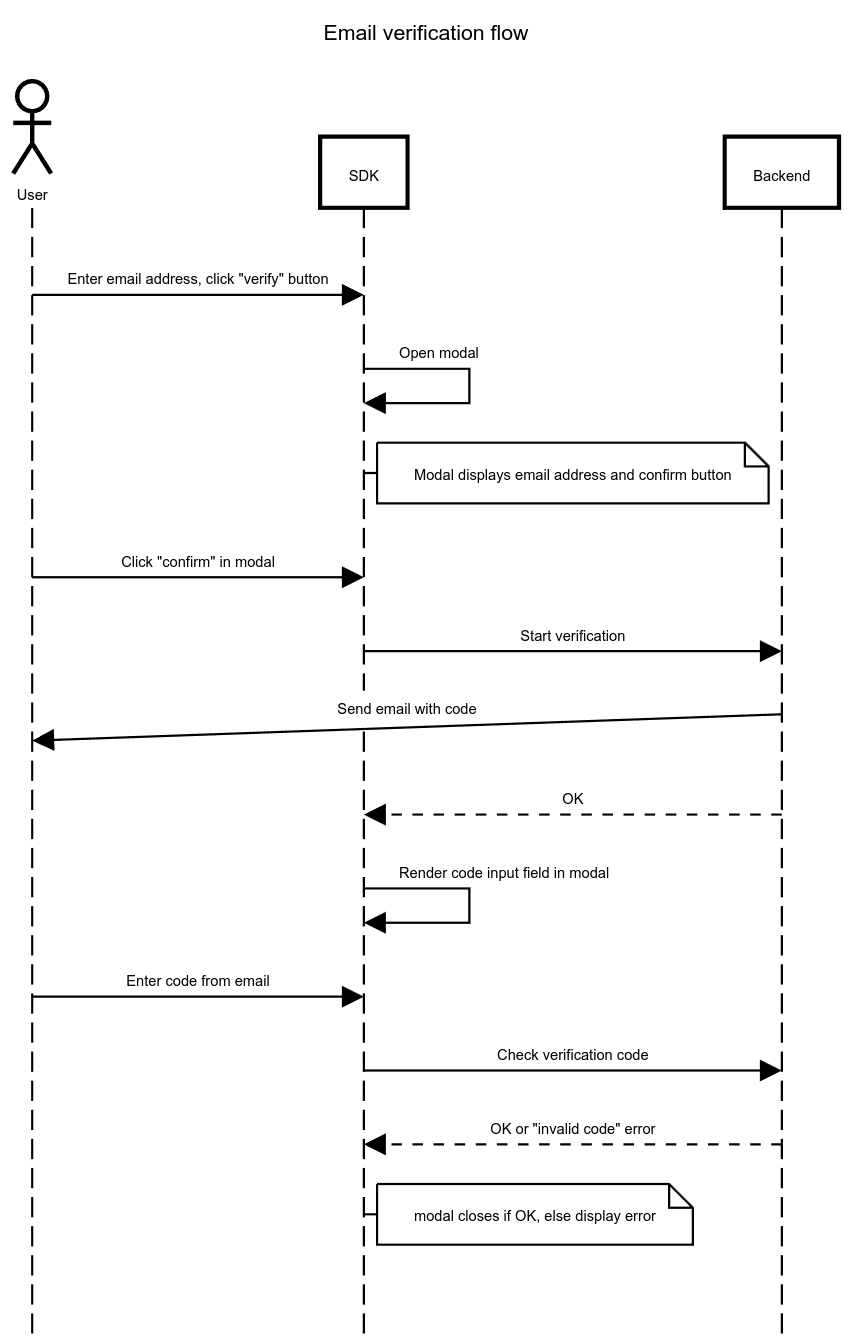
Description
The verification process starts with an explicit confirm action by the user (clicking the confirm button in the modal rendered by the SDK).
This triggers an API call that creates the verification request in the backend. It captures (and validates) the submission, the email address and the formio component key of the email component. Multiple email components can be present in the form, each requiring verification. A code is generated and stored in the database, and an email is sent containing the generated code. The code may not be exposed via the API.
Upon successful start, the modal confirms that an email is underway (repeating the email address) and displays an input field for the verification code.
The user can enter the code and click a “confirm” button to verify the code. The API endpoint receives submission, component key, email address and code. On success, the backend updates the state to
verified: true.The modal closes and the user can continue with the rest of the form.
Once the step is submitted, backend validation checks that the values of email components have a matching verified status, if not, validation errors are displayed.
Design decisions made
No unique constraints
No unique constraints to enforce the combination of email, component key and submission to be unique. The reason for this is that it’s possible an email does not arrive, and in those situations, users must be able to request another verification, which ideally has a different code.
Additionally, doing de-duplication checks complicates the implementation, and the cost of allowing duplicates is low.
Multiple email addresses for the same component are allowed
Multiple (different) addresses are allowed for two reasons:
the component may have
{"multiple": True}, which associates multiple values with a single component/field already. Each address needs to be verified to proceed.the user may make a mistake, realize (because of the verification) that they made a typo, and correct their input. This naturally leads to multiple values for the same component, of which only one is actually relevant.
Verification codes are not globally unique
We randomly generate 6-character verification codes (excluding confusing characters), which has a chance of producing the same code multiple times. A code is used in the context of a single submission and a single form component/field, they cannot be used in other submissions belonging to someone else.
Brute forcing verification codes
The default rate limits and permission checks should mitigate this. If needed, additional protections can be added in the future.